Introduction
In today’s digital world, images speak louder than words. Whether it’s old family photos, blurry selfies, low-quality videos, or social media content, everyone wants clear, sharp, and professional-looking visuals. This is where Remini – AI Photo Enhancer comes in.
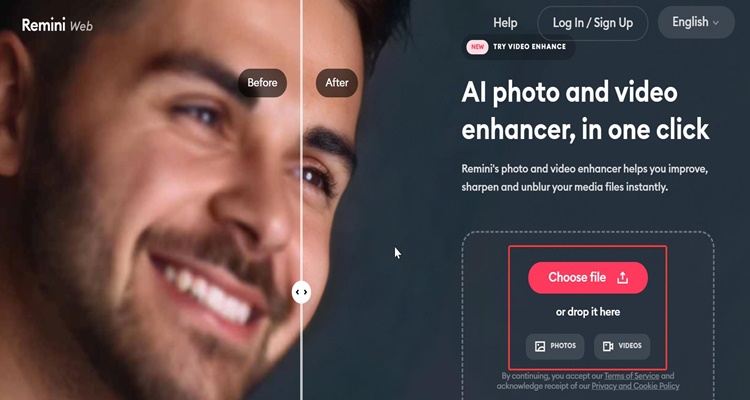
Remini is an AI-powered photo and video enhancement app that uses advanced machine learning algorithms to transform low-resolution, blurry, or damaged images into high-quality visuals. Over the last few years, Remini has gained massive popularity among content creators, photographers, students, and everyday users.
In this detailed guide, we’ll explore what Remini is, how it works, its features, benefits, limitations, pricing, and whether it’s worth using in 2026.
What Is Remini – AI Photo Enhancer?
Remini is an artificial intelligence-based application designed to enhance photos and videos automatically. It uses deep learning neural networks trained on millions of high-quality images to reconstruct missing details in low-quality media.
Originally launched as a photo enhancement tool, Remini has now evolved into a complete AI media enhancement platform, supporting:
-
Photo upscaling
-
Face enhancement
-
Old photo restoration
-
Video quality improvement
-
AI-generated portraits
Remini is available on:
-
Android
-
iOS
-
Web version (Remini Web)
How Does Remini AI Work?
Remini works on a concept called super-resolution using deep neural networks.
Behind the Scenes (Simplified Explanation)
-
The AI analyzes your image pixel by pixel
-
It identifies faces, edges, textures, and patterns
-
Missing details are reconstructed, not just sharpened
-
The final image looks clearer, more detailed, and more realistic
Unlike traditional photo editors that only increase sharpness or contrast, Remini predicts and rebuilds missing visual information, which is why results often feel magical.
Key Features of Remini AI Photo Enhancer
1. AI Photo Enhancement
Remini can turn:
-
Blurry photos → sharp images
-
Low-resolution images → HD quality
-
Pixelated faces → clear facial features
Perfect for old selfies, scanned photos, or social media images.
2. Old Photo Restoration
One of Remini’s most loved features is restoring old and damaged photos.
It can:
-
Remove noise and scratches
-
Enhance faded faces
-
Improve contrast in black & white photos
This feature is widely used for family history and heritage preservation.
3. AI Face Enhancer
Remini is especially powerful when it comes to human faces.
It can:
-
Enhance eyes, skin, and facial details
-
Improve portraits taken in poor lighting
-
Fix motion blur in faces
This makes it extremely popular among content creators and influencers.
4. AI Video Enhancement
Remini doesn’t stop at photos.
It can:
-
Upscale low-quality videos
-
Enhance old recorded clips
-
Improve facial clarity in videos
Although video processing takes more time, the results are impressive.
5. AI Portrait & Avatar Generation
Remini also offers:
-
AI-generated portraits
-
Professional-looking profile images
-
Stylized AI headshots
Useful for LinkedIn, CVs, YouTube thumbnails, and branding.
Remini Web vs Mobile App
| Feature | Mobile App | Web Version |
|---|---|---|
| Photo Enhancement | ✅ Yes | ✅ Yes |
| Video Enhancement | ✅ Yes | ⚠️ Limited |
| Speed | Fast | Medium |
| Ads | Yes (Free) | Fewer |
| Ease of Use | Very Easy | Easy |
If you’re a casual user, the mobile app is enough.
If you’re a blogger or content creator, the web version is more convenient.
Is Remini Free or Paid?
Free Version
-
Limited daily enhancements
-
Watermark on images
-
Ads included
Premium Version (Remini Pro)
-
Unlimited enhancements
-
No watermark
-
Faster processing
-
Access to all AI models
Pricing varies by region, but overall it’s affordable compared to professional editing tools.
Pros and Cons of Remini AI
✅ Pros
-
Extremely easy to use
-
No editing skills required
-
Powerful AI face enhancement
-
Works on old and damaged photos
-
Available on multiple platforms
❌ Cons
-
Free version has ads
-
Over-enhancement sometimes looks artificial
-
Video enhancement can be slow
-
Requires internet connection
Is Remini Safe to Use?
This is a common question.
Remini states that:
-
Uploaded images are processed securely
-
Data is not publicly shared
-
Users should avoid uploading sensitive images
However, as with any AI cloud service, avoid uploading private or confidential photos.
Who Should Use Remini?
Remini is ideal for:
-
Bloggers and content creators
-
YouTubers and thumbnail designers
-
Students and teachers
-
Social media users
-
People restoring old family photos
If you want quick, high-quality results without learning Photoshop, Remini is a great choice.
Remini vs Photoshop: Which Is Better?
| Feature | Remini | Photoshop |
|---|---|---|
| AI Enhancement | ✅ Excellent | ⚠️ Manual |
| Ease of Use | ⭐⭐⭐⭐⭐ | ⭐⭐ |
| Time Required | Seconds | Hours |
| Skill Needed | None | High |
| Professional Control | ❌ Limited | ✅ Full |
Verdict:
Remini is best for speed and simplicity, while Photoshop is better for advanced professionals.
SEO Use Cases of Remini for Bloggers
For bloggers, Remini helps with:
-
Enhancing featured images
-
Improving old blog visuals
-
Creating high-quality thumbnails
-
Increasing user engagement and CTR
Clear images = better user experience + better SEO.
Frequently Asked Questions (FAQs)
Is Remini AI really effective?
Yes, especially for face enhancement and old photo restoration.
Does Remini work offline?
No, Remini requires an internet connection.
Can Remini enhance very old photos?
Yes, but results depend on the original image quality.
Is Remini good for YouTube thumbnails?
Absolutely. Many creators use it for face enhancement.
Final Verdict: Is Remini Worth It?
Yes, Remini is worth using, especially if you want fast, AI-powered photo enhancement without technical skills