Smartphones in 2026 are insanely powerful—AI assistants, console-level gaming, 8K video, and real-time translation are now everyday features. Still… many Android users complain about lag, app reloads, and stutters.
Good news? You don’t always need a new phone.
In this in-depth guide, you’ll learn how to boost Android mobile RAM in 2026, improve multitasking, and squeeze every bit of performance from your device—using both built-in tools and smart optimizations.
Whether you’re rocking a flagship from Samsung or a budget powerhouse by Xiaomi, these tips work across most Android phones backed by Google and brands like OnePlus.
Let’s dive in. 🚀
📱 What Is RAM on Android Phones?
RAM (Random Access Memory) is the temporary workspace where apps, games, and system processes run.
More efficient RAM usage means:
-
Faster app switching
-
Fewer reloads
-
Smoother gaming
-
Less overheating
-
Better battery efficiency
In 2026, phones ship with 8GB–24GB RAM, but Android also uses AI-based background management—so optimization matters just as much as raw numbers.
🔥 Why Android Phones Still Feel Slow in 2026
Even modern phones slow down because of:
-
Too many background apps
-
Heavy AI assistants running nonstop
-
Social apps caching massive data
-
System animations
-
Storage nearly full
-
Malware or shady apps
-
Outdated firmware
Now let’s fix all that.
✅ Best Ways to Boost Android RAM in 2026
1️⃣ Use Android’s Built-In RAM Optimizer
Most Android skins in 2026 include smart memory tools:
-
Settings → Battery & Performance
-
Settings → Device Care
-
Settings → Memory Booster / RAM Manager
Tap Optimize or Clean Memory to close idle processes.
👉 Pro tip: run this once daily, not obsessively—Android likes managing RAM itself.
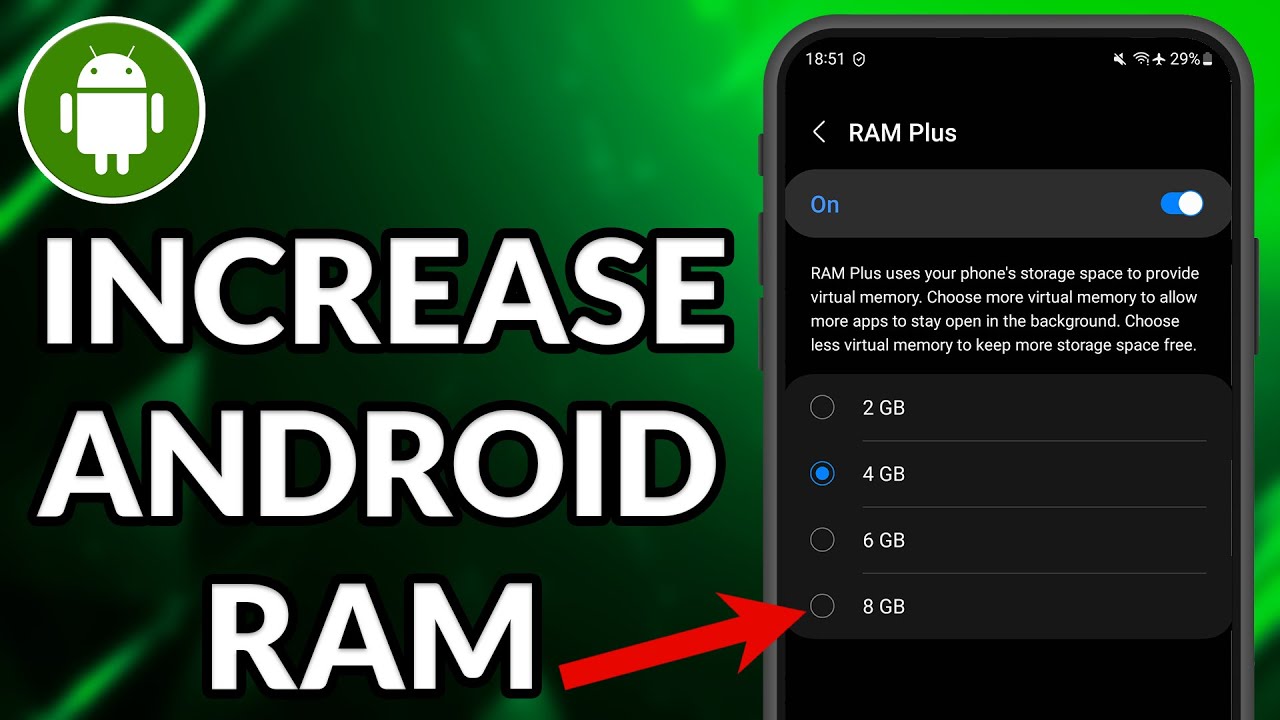
2️⃣ Enable Virtual RAM / RAM Expansion
A huge 2026 trend is Virtual RAM (also called RAM Plus or Memory Fusion).
It uses part of your internal storage as temporary RAM.
How to enable:
-
Settings → Performance / Additional Settings
-
Virtual RAM / RAM Expansion
-
Select size (4GB–12GB recommended)
-
Restart phone
⚠️ Don’t max it out—too much can stress storage chips.
3️⃣ Remove Heavy Background Apps
Apps like social networks, shopping apps, and AI chat tools run silently.
Check:
Settings → Apps → Running in Background
Restrict or uninstall:
-
Rarely used games
-
Old shopping apps
-
Pre-installed bloatware
-
Duplicate utilities
Less background load = more free RAM instantly.
4️⃣ Turn Off Auto-Start Apps
In 2026 many apps register themselves to boot automatically.
Disable them:
-
Settings → Apps → Auto-launch
-
Toggle OFF non-essential apps
This alone can free hundreds of MBs of RAM.
5️⃣ Use Lite Versions of Apps
Big apps = big RAM usage.
Switch to:
-
Facebook Lite
-
Messenger Lite
-
YouTube Lite / Web version
-
Google Go
They run faster and consume 40–60% less memory.
6️⃣ Reduce Animations for Instant Speed
Animations eat RAM and GPU cycles.
Enable Developer Options:
-
Settings → About Phone → Tap Build Number 7 times
-
Developer Options → Animation Scales
-
Set to 0.5x or Off
Boom—your phone feels snappier instantly.
7️⃣ Keep At Least 20% Storage Free
Android uses storage for caching and virtual memory.
If storage is almost full:
-
RAM management worsens
-
Apps reload constantly
-
Virtual RAM slows down
Delete:
-
Old videos
-
Duplicate photos
-
Offline downloads
-
Unused apps
Aim for 20–25% free space.
8️⃣ Update Your Phone Regularly
Android updates in 2026 focus heavily on:
-
AI-based memory prediction
-
Faster app freezing
-
Smarter cache eviction
-
Thermal-aware RAM control
Always install:
-
Security patches
-
Monthly performance updates
-
System UI upgrades
9️⃣ Scan for Malware & Spyware
Some rogue apps secretly eat RAM.
Use Play Protect or a trusted antivirus to scan monthly.
Signs of trouble:
-
Phone heats up while idle
-
RAM always full
-
Sudden battery drain
-
Pop-up ads
Remove suspicious apps immediately.
🔧 Advanced Power-User Tips (2026 Edition)
If you’re comfortable tweaking:
✔️ Disable Rare System Services
Some manufacturer services run constantly. Carefully disable what you don’t use (themes engines, feedback tools, demo apps).
✔️ Use Focus / Game Mode
Modern Android modes lock background apps and free RAM when gaming or working.
✔️ Restart Weekly
Yes—it still helps! A weekly reboot clears stuck processes and memory leaks.
❌ Myths About Boosting Android RAM
Let’s bust a few:
🚫 Task killer apps – Usually unnecessary in 2026
🚫 “RAM booster” apps – Often fake and drain battery
🚫 Clearing RAM every hour – Makes things worse
🚫 Rooting for speed – Risky and rarely worth it now
Stick to system tools instead.
📊 How Much RAM Is Enough in 2026?
-
6–8GB → Basic users
-
12GB → Multitaskers & gamers
-
16GB+ → Power users, creators, AI workflows
But even 8GB can feel blazing fast if optimized properly.
🚀 Final Thoughts: Make Your Android Fly in 2026
Boosting Android RAM in 2026 isn’t about shady apps—it’s about smart configuration:
✔ Enable Virtual RAM
✔ Control background apps
✔ Free storage
✔ Reduce animations
✔ Update regularly
✔ Avoid fake boosters